
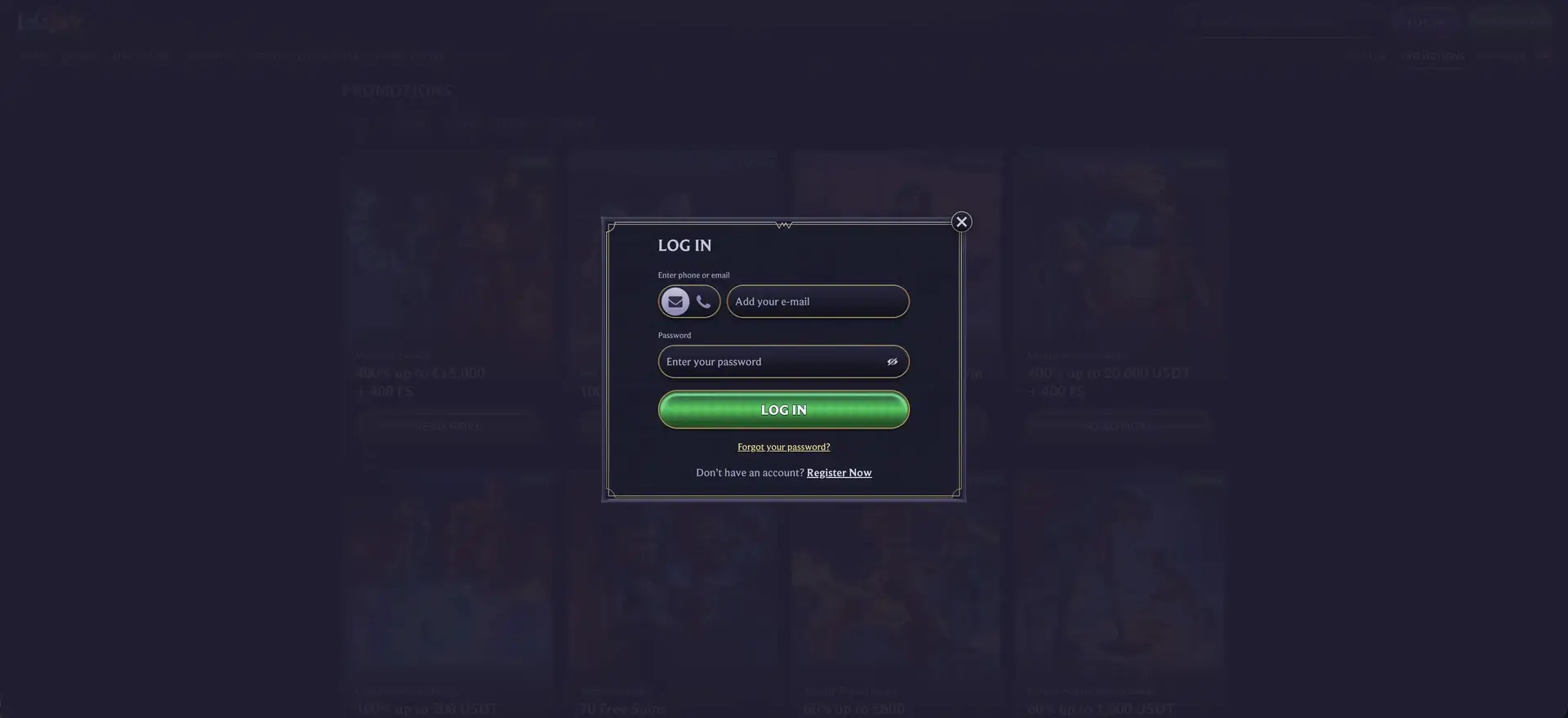
The Lolajack login is done through the LOG IN button in the top-right corner of the site: enter your email address or phone number with your password and press LOG IN to open your account. If the password is lost, the "Forgot your password?" link under the form sends a reset, and new players can switch straight to registration through the "Register Now" link in the same window. The sign-in form is identical on desktop and on mobile browsers in Australia, so one account gives access to the casino, live casino, sportsbook, AUD cashier, bonuses and VIP Club from any device.
The account is protected by a password and SSL-encrypted connection, and identity checks are added at the first withdrawal. The guide below covers each step of signing in, recovering access and solving the most common problems.
| Login essentials | Details |
|---|---|
| Where to log in | LOG IN button, top-right corner of every page |
| Login method | Email or phone number + password |
| Switching between email and phone | Envelope and phone icons beside the input field |
| Password visibility | Eye icon to show or hide the password while typing |
| Password reset | "Forgot your password?" link under the LOG IN button |
| Device support | Desktop and mobile browsers on Windows, macOS, iOS and Android |
| Session security | SSL-encrypted connection |
| When verification appears | Usually at the first withdrawal or on unusual account activity |
| Currency | AUD for Australian accounts, plus crypto balances |
| Support | 24/7 live chat |
How to Log In to Lolajack
Signing in takes less than a minute. The login window opens on top of the current page, so after signing in the player stays on the same section, for example a promotion or a game.
Step-by-step Lolajack sign in
The sequence below applies to both email and phone logins. The only difference is which icon is selected beside the input field.
- Open the official Lolajack website in your browser.
- Click the purple LOG IN button in the top-right corner.
- Select the envelope icon to sign in with email, or the phone icon to sign in with your phone number.
- Enter the email address or phone number linked to the account.
- Type your password; use the eye icon to check it for typos.
- Click the green LOG IN button and wait for the account menu and balance to appear.
Create an Account if You Have No Profile Yet
Players without an account can click "Register Now" at the bottom of the login window or the green REGISTER button in the header. Registration at Lolajack begins with the bonus choice, so it is worth deciding beforehand whether to take a welcome offer.
Quick registration flow
The sign-up form has two steps and the whole process is the same on every device.
- Select a welcome option: the casino package of 400% up to about AUD 26,250 + 400 free spins, the sports bonus of 100% up to about AUD 175, a crypto version of either, a promo code, or no bonus.
- Enter an email address and create a password on step 1 of 2.
- Confirm that you are 18 or older and accept the Terms & Conditions and Privacy Notice; the marketing opt-in is optional.
- Click NEXT STEP and fill in your personal details exactly as they appear on your ID.
- Log in with the new email and password from then on.
Secure Login Practices
Most account problems come from weak or reused passwords and shared devices. A few simple habits keep a Lolajack account protected.
- Use a unique password of at least 12 characters with letters, numbers and symbols.
- Do not reuse the password from your email or other gambling accounts.
- Save the login in a password manager rather than in a note on the phone.
- Log out after playing on a shared or public computer.
- Only sign in through the official website address, never through links in unsolicited messages.
- Keep the email account linked to Lolajack secure, since password resets are sent there.
Lolajack Password Recovery
A forgotten password can be reset directly from the login window. The reset link is sent to the contact details registered on the account, so access to that inbox or phone is required.
Reset steps
The full recovery process usually takes a few minutes.
- Click LOG IN and then "Forgot your password?" under the green button.
- Enter the email address used at registration.
- Open the reset message in your inbox; check the spam and promotions folders if it does not arrive.
- Follow the link and set a new password that you have not used before.
- Return to Lolajack and sign in with the new password.
If the reset message does not arrive within a reasonable time, or if the email address itself is no longer accessible, live chat support can help confirm ownership of the account.
Lolajack Login on Mobile
The mobile site uses the same login window as the desktop version. It opens in Safari, Chrome, Firefox or any modern browser on iPhone, iPad and Android devices, and no app download is needed.
Tips for mobile sign in
A few settings make logging in from a phone faster and safer.
- Add Lolajack to the home screen so the site opens in one tap without typing the address.
- Allow the browser or password manager to autofill the login only on a personal device.
- Use phone-number login if typing an email address on a small keyboard is inconvenient.
- Switch from Wi-Fi to mobile data, or the reverse, if the page does not load.
Troubleshooting Common Lolajack Login Errors
Most sign-in problems have simple causes and can be solved without contacting support. The most frequent situations are covered below.
Incorrect credentials
An error after pressing LOG IN usually means a typo or the wrong login type. Check the following points:
- Make sure the correct icon is selected: email or phone.
- Passwords are case-sensitive; check that Caps Lock is off.
- Use the eye icon to view the password before submitting.
- Confirm the email address has no extra spaces at the start or end.
Browser or cache issues
If the login window does not open, the button does not respond, or the page reloads without signing in, the browser is usually the cause.
- Clear the browser cache and cookies, then reload the page.
- Disable extensions that block scripts, pop-ups or third-party content.
- Update the browser to the latest version, or try another browser.
- Check the device date and time, since incorrect settings can break secure connections.
Site does not load
If the Lolajack website itself does not open from Australia, the issue is usually the network rather than the account. Restarting the router, switching between Wi-Fi and mobile data, or contacting live chat for the current official address normally resolves it.
Account blocked or restricted
An account can be locked after several failed password attempts, during a pending verification, or when a self-exclusion or cooling-off period is active. In these cases the only solution is to contact 24/7 live chat, explain the situation and follow the instructions provided.
What You Can Access After Lolajack Login
Once signed in, the header shows the balance and account menu, and all real-money features become available.
- Cashier - deposits and withdrawals in AUD or crypto.
- Bonuses - active offers, wagering progress and free spins.
- VIP Club - current level, points and progress toward the next reward.
- Rewards - coin balance, weekly challenges, the Shop and collections.
- Tournaments - active events and leaderboards.
- Sportsbook - bet slip, open bets and settled bets.
- Account settings - personal details, verification and responsible gambling limits.
Account Verification (KYC)
Lolajack, like every licensed casino, verifies players before paying out. Verification usually appears at the first withdrawal request, and it can also be requested if account details change or unusual activity is detected.
Typical documents are listed below. Uploading them early, before the first withdrawal, shortens the waiting time when the payout is requested.
- Photo ID: passport, Australian driver licence or national ID card.
- Proof of address: utility bill, bank statement or government letter dated within the last three months.
- Proof of payment method: a photo of the card with the middle digits covered, or a statement from the e-wallet or crypto wallet account.
FAQ
Answers to the most common questions about signing in to Lolajack are collected below.
How do I log in to Lolajack?
Click LOG IN in the top-right corner, choose email or phone, enter your details and password, and press the green LOG IN button.
Can I use my phone number for Lolajack login?
Yes. The login form has an envelope icon for email and a phone icon for phone-number sign in.
What should I do if I forgot my Lolajack password?
Use the "Forgot your password?" link in the login window, follow the reset link sent to your email and set a new password.
Is the Lolajack login the same on mobile?
Yes. The mobile browser version uses the same login window and the same account as the desktop site.
Why is my Lolajack account locked?
Common reasons are several failed password attempts, a pending verification or an active self-exclusion. Contact 24/7 live chat to restore access.
Do I need to verify my account to log in?
No. Verification is not needed to sign in or deposit, but it is normally required before the first withdrawal.
Updated 16 October 2026.